
Product finder
Select your intended use
Match a real-world scenario to the right TruDat product. Choose a scenario and press Go for the step-by-step guide — user account, corporate account (if needed), then create on trudat.ai.
- Choose a scenario from the menu
- Review your product match
- Press Go for the guide
Open the menu below and pick the situation that best matches what you want to run.
Your match
Limits above are for your chosen scenario — not every product uses response options. Compare all products
Polls
Verified polling with continuous sentiment
TruDat polls are designed for integrity of public signal — timestamped votes, approximate location at vote time, and regional filters for analysis by place and segment.
- Open polls — single-question polls with 2 to 6 response options
- Continuous sentiment — unique timestamped records; latest vote counts when response options change
- Location at vote time — no location, no vote; approximate coordinates for regional filtering only
- Regional truth — country, region, and custom demographic filters
- Research panels — seat-controlled private polls for controlled studies
- Live analytics — time-series, heat maps, and regional breakdowns
Browse polls · Question design guide · Which poll type fits?

Polls · Live sessions
TruDat Studio
Corporate and enterprise live voting for studio shows, live events, and closed research rooms. Same verification as standard polls — QR or vote link, projection to venue screens, producer control room.
Session workflow
- Create — private event, audience cap, venue settings
- Control room — manage session phases, on-screen QR, and projection
- Audience — verify once, vote from phone; live results on display
- Up to 10 contestants per live session
- QR code link
- Projection hub + display mirror — venue screens and backstage tallies
- Private research mode — unlisted sessions for closed panels
TruDat Studio is available on corporate and enterprise accounts. Account tiers · Studio guide

What it looks like in the room
Tap a preview to enlarge. Audience vote grid and producer control room on trudat.ai.
Polls · Distributed choice
TruDat Election
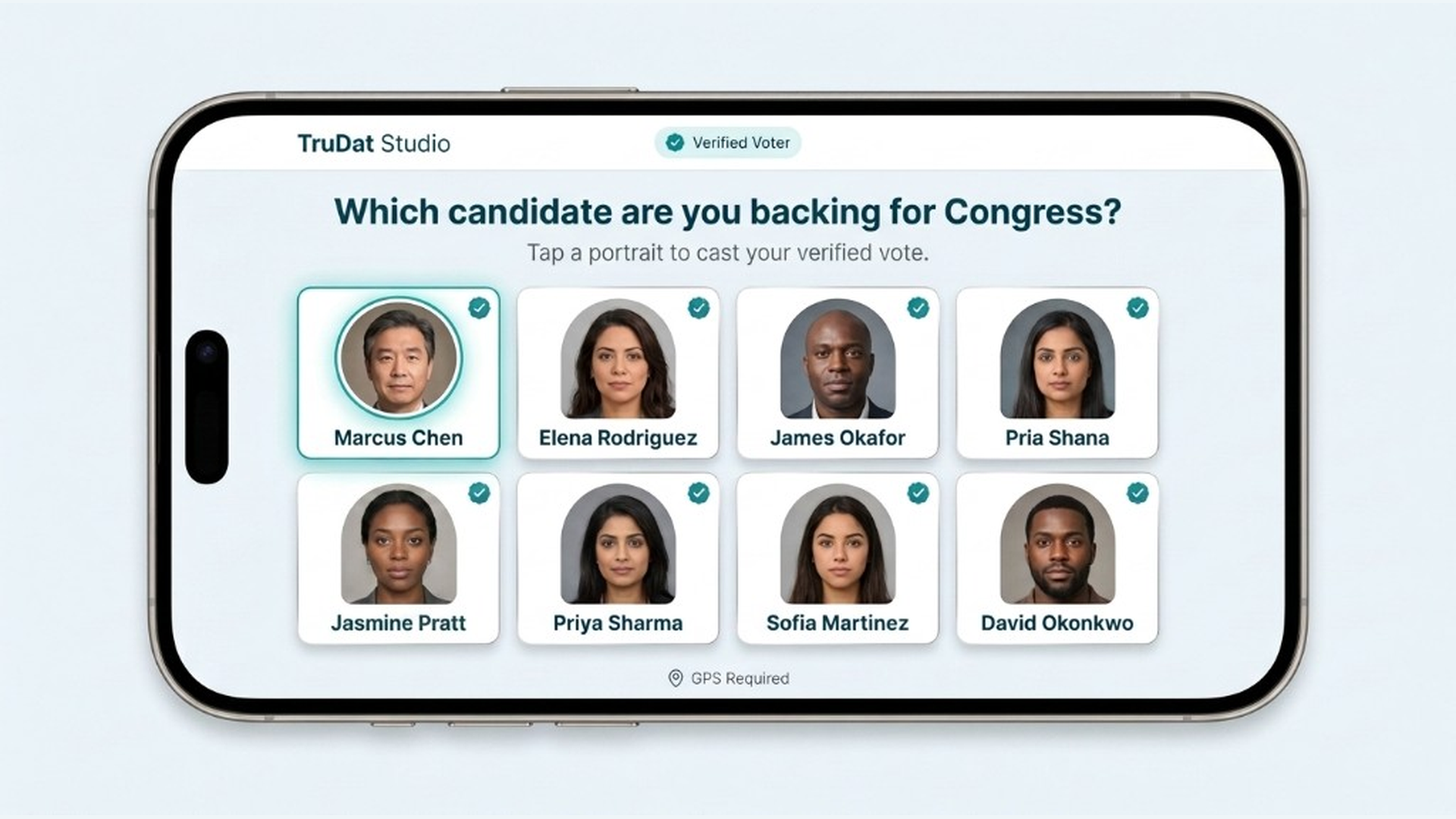
Corporate Election polls for political and candidate-choice scenarios — listed for public discovery by default, approximate location mapping on every vote, HeatMap and Advanced Analytics, and up to ten candidates with optional image grid voting.
How Election differs from Studio
- Open-poll lifecycle — draft, live, and end date (not venue session phases)
- Location-mapped results — regional outcomes based on where people vote
- Public listed by default — option also available to keep the election private and unlisted
- Up to 10 candidates — image grid vote experience
- Rewards available — optional incentives for voters
- HeatMap + Advanced Analytics — regional results also available
- QR code or vote link — share like Studio and MCA
Response option limits across TruDat
- Live poll & research panel — 2 to 6 response options
- TruDat Studio & Election — up to 10 response options or candidates
- Surveys & Audience Research — multi-question sequences
Only corporate group administrators can create Election polls. A corporate account is required. Register · Create Group · Election guide
Multiple Choice Assessment · timed scoring
Timed assessments — for training and quizzes.
Multiple Choice Assessment (MCA) is TruDat's timed assessment format for corporate training, compliance checks, biblical knowledge quizzes, geography trivia, and promotional challenges. Creators set up to 50 questions, each with up to six options and exactly one correct answer, plus one adjustable total timer.
Corporate Administrators create assessments for their organisation. MCAs are never publicly displayed on TruDat — people can only open them via a shared link or QR code (login required).
At a glance
Compare poll types, surveys, and petitions
All products share the same verification standard — email, phone, and approximate location at vote or sign time. Personal accounts are for individuals; corporate accounts are for organisations (personal account required first).
Personal: Yes / Not available Corporate: Yes (optional) / Required
| Live poll Polls → | Research panel Student research → | Petition Petitions → | TruDat Studio Studio → | Election Election → | Corporate survey Surveys → | Audience Research Audience → | MCA MCA → | |
|---|---|---|---|---|---|---|---|---|
| Best for | Newsroom pulse, civic issues, quick verified snapshots | Student projects, dissertations, focus groups, and closed academic studies | Campaign signatures with evidence for officials and media | Live venues — town halls, studio shows, corporate events | Political and distributed candidate choice — public listed polls | Ordered questionnaires — HR, product, governance | Open survey waves — recruitment cycles and industry panels | Timed scored assessments — training, compliance, promo quizzes |
| Personal account | Yes — Bronze or above | Yes — Bronze or above | Yes — Bronze or above | Not available | Not available | Not available | Not available | Not available |
| Corporate account | Yes — optional | Yes — optional | Yes — optional | Required | Required | Required | Required | Required |
| Format | Single question per poll | Single question — fixed seats, one link per participant | Sign once — verified endorsement | Single poll per live session | Single question — candidate image grid | Multi-question sequence | Multi-question sequence | Timed multi-question test with scoring (timer after first answer) |
| Max response options | 2–6 response options | 2–6 response options | N/A (signatures) | Up to 10 response options | Up to 10 candidates | Multi-question | Multi-question | Up to 50 questions × 6 options |
| Time window | Optional close date | Until all seats vote, then optional listing | Open until target or close date | Session-based (live event) | Draft / live / end date (like open polls) | Creator-controlled schedule | No fixed end — stays open for waves | Required start + end dates + total timer |
| Participation | Public link, QR, or listed on TruDat | Private seat links — not listed until panel complete | Public link or QR | QR on screen — capped or private audience | Public listed or private — approximate location mapping | Open recruitment or seated panel tokens | Stable entry QR — open or seated panel | Shared link or QR only — never publicly listed (login required) |
| Live display | Dashboard & embeds | Dashboard analytics | Signature counts & geography | Venue projection & control room | HeatMap & Advanced Analytics | Dashboard analytics | Dashboard & aggregate reporting | End card + Administrator score sheet; per-question Analytics & Heat map (admins only) |
| Verification | Email, phone, and location at vote | Same as live polls | Email, phone, and location at sign | Same as live polls | Same as live polls | Same as live polls | Same as live polls | Same as live polls |
Not sure which fits? Find your product · Enterprise enquiry or discuss a pilot.